


Chatta - Live Meet Friends
4.7272.00 Reviews
App Specs
- Version
- 2.1.200
- Updated On
- License
- Free
- Downloads
- 10,000,000+
- Developer
- METAZ TECHNOLOGY PTE. LTD.
- Categories
- Social
- Platform
- Android
Screenshots

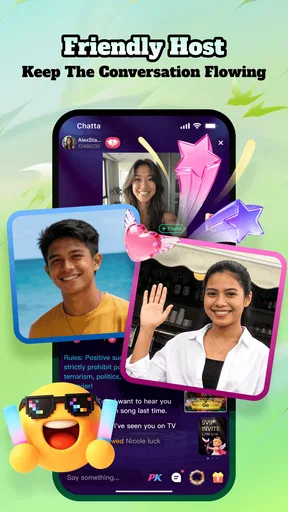


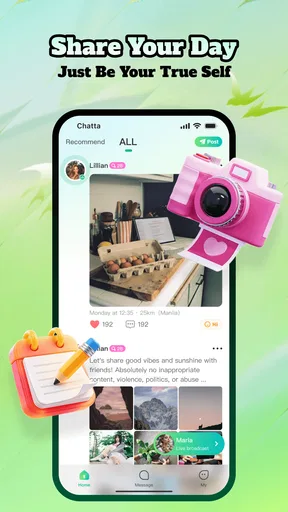

 Analysis by AppCompare
I approached Chatta - Live Meet Friends as a social app for people who want conversation to happen in real time rather than through carefully edited posts. Its focus is direct interaction: chatting, joining live streams, and meeting people beyond your existing circle. That makes it more immediate than a typical social feed, but it also means the quality of the experience depends heavily on who you encounter and how deliberately you use it.
In my experience, the app makes the most sense when you want a quick social outlet, a place to discover live conversations, or an easy way to speak with people from different parts of the world. It is free to install, belongs to the social category, and is published by METAZ TECHNOLOGY PTE. LTD. The app has built a sizeable audience, with over ten million installs and a 4.7 average from around 132 thousand ratings. Those figures suggest that its basic idea is resonating, although popularity should not be confused with a guarantee that every conversation will be worthwhile.
How Chatta fits into a shared household
The most realistic household scenario is not everyone using one social account together. Instead, one person may use Chatta on a shared tablet or a phone that other family members also pick up during the day. A teenager might want to explore live conversations, while an adult uses the same device for ordinary communication or entertainment. That arrangement can work, but only if the household treats the account as personal rather than communal.
Live social apps are particularly sensitive to blurred account boundaries. A message, profile change, or conversation opened by one person may be visible to the next person who uses the device. I would not hand the app to a child simply because it is installed on a family device. The service is marked Mature 17+, so the appropriate starting point is a clear age boundary: it is intended for older users, not for casual access by younger children.
For adults sharing a device, I recommend deciding in advance who owns the account and who is allowed to open it. That sounds obvious, but it prevents a surprisingly common problem: one household member assumes the app is a general family tool, while another treats it as a private social space. Chatta is built around personal interaction, so the second interpretation is the safer one.
A useful everyday example would be a university student living with relatives and using a common tablet in the evening. The student can use the app for live conversations, but should close the session before putting the tablet back on the coffee table. Other household members should not browse through chats out of curiosity, and the account holder should avoid leaving an active conversation open. This is not a special Chatta feature; it is simply sensible behavior for a social app where conversations can be personal and unpredictable.
What the first session feels like
The appeal is easy to understand. Instead of waiting for a carefully composed post to attract attention, you can move toward live interaction and discover people as they are talking. That immediacy gives the app more energy than a quiet profile-based network. It can also make the first few minutes feel less predictable, because the experience is shaped by the live community rather than by a fixed list of contacts.
Worth Reading Before You Choose

Switching to Android Auto Means Rethinking Your Driving Routine

Google Calendar Makes a Crowded Week Easier to Manage

Baby Panda World Brings Quick Play to Modern Phones, but Its Game Library Feels Busy

ESPN’s Live Game View Makes Following Close Games Easier

QuizzLand Review: A Good Fit for Short Trivia Breaks, Not Every Player

Basketball Stars: Multiplayer Is Fast, but Can It Recover When Matches Go Wrong?
I found that this format works best when I entered with a small purpose. “I want to see what people are discussing for ten minutes” is more useful than opening the app without any boundary and drifting through conversations indefinitely. A short session helps you judge whether the current atmosphere suits you without allowing the app to take over your evening.
Chatta is not the same as a conventional messaging app. A service such as a private messenger is usually strongest when you already know the people you want to contact. A traditional social network is often better for following familiar accounts and catching up asynchronously. Chatta sits closer to spontaneous discovery: it is more about finding interaction than maintaining an established contact list.
That distinction matters. If your priority is reliable communication with family, colleagues, or a small group of trusted friends, I would choose a private messaging service instead. If you want public posts, long-term profiles, or a carefully organized feed, a conventional social network may feel more comfortable. Chatta is the better fit when the possibility of meeting someone new is part of the point.
Setting boundaries before sharing a device
The most important setup decision is account ownership. Each person should use their own account rather than passing one login around. A shared login makes it difficult to tell which conversations belong to whom, and it can create awkward misunderstandings when someone replies from the wrong identity. On a personal social app, separation is more valuable than convenience.
I would also keep the app away from a child’s casual browsing routine. The Mature 17+ label is not decorative; it should shape where the app is installed and who can open it. A family with younger children may prefer to keep Chatta on an adult-owned phone instead of a shared tablet. That does not create a technical barrier by itself, but it creates a clearer household rule.
Another practical boundary is notification awareness. Live social apps can pull attention back at inconvenient moments, especially when a device is used by several people. Before lending a phone or leaving it in a shared room, I would review whether incoming alerts could expose private conversation context on the lock screen. The exact behavior depends on the device and its notification settings, so the useful habit is to check the phone directly rather than assume privacy is automatic.
There is also a difference between sharing hardware and sharing access. A family can share a tablet while keeping separate user profiles on the operating system, when the device supports them. If that option is available, it is preferable to leaving one Chatta session active for everyone. If separate device profiles are not practical, the account holder should sign out or otherwise close the app when finished, then confirm that the next person cannot immediately continue the session.
These steps may sound cautious for a free app, but free does not mean consequence-free. Chatta includes in-app purchases ranging from twenty cents to nearly two hundred eighty-five dollars per item. I would therefore avoid allowing an unsupervised child to use a device where the account or payment setup can be reached. Adults should also understand that a low-cost first purchase and a much more expensive item can exist within the same app environment.
Coordinating use without turning it into a family project
Household coordination works best when it stays simple. I would agree on three rules: who may use the app, when a shared device is private, and what to do if a conversation becomes uncomfortable. The goal is not to monitor every interaction. It is to remove uncertainty before it causes conflict.
For adults, a short conversation can be enough. If one person uses Chatta for live streams after dinner, another person should know that the device is unavailable during that period. If the phone must be borrowed, the borrower should ask rather than opening the app automatically. These are ordinary courtesy rules, but they matter more when the app contains personal conversations instead of a public news feed.
For a household with an older teenager, I would discuss the difference between discovering someone interesting and trusting that person. Chatta can make international conversation feel immediate, but a lively exchange is not proof of identity, good intentions, or compatibility. I would encourage the teenager to keep early conversations inside the app, avoid rushing into private contact elsewhere, and stop responding when the interaction becomes pressuring or manipulative.
One of the more useful habits is to set a time purpose for each visit. A user might open Chatta to join a live stream, spend a limited period exploring, and leave once the conversation stops being enjoyable. This prevents the common trap of continuing simply because the next interaction might be better. It also makes shared-device coordination easier because other people can predict when the device will be available again.
Another practical tip is to separate discovery from commitment. Browsing live conversations can be casual, while continuing a private chat deserves more thought. I would not treat every new contact as someone who needs an immediate reply. Leaving a conversation for later is often wiser than responding quickly while distracted, tired, or surrounded by family members.
Age, trust, and the limits of live social interaction
The 17+ age context is the clearest reason I would not recommend Chatta for children. The app’s purpose is meeting and talking with people, and that open-ended format can expose users to conversations that are unsuitable, uncomfortable, or simply more intense than expected. A younger user may also have a harder time recognizing pressure, misleading behavior, or attempts to move a conversation too quickly.
Older users should not assume that the age label makes every interaction safe. It describes the intended audience; it does not turn strangers into trusted contacts. I would treat profiles and conversations as introductions, not evidence. Do not share a home address, school details, workplace routines, financial information, or anything that would make it easier for a stranger to locate you offline.
Trust should build slowly. If someone becomes demanding, asks for money, insists on secrecy, or tries to make you feel guilty for ending the conversation, I would leave rather than negotiate. The same advice applies when a live stream feels hostile or uncomfortable. The value of a social app is not measured by how long you tolerate an unpleasant interaction.
Privacy also matters within the household. Parents or partners may be curious about who is using Chatta, but curiosity is not a reason to read private messages without permission. The better approach is to establish expectations openly: the account belongs to one person, the device may be shared, and private conversations remain private unless there is a serious safety concern.
That balance is especially important with older teenagers. A rule that simply says “never use it” may encourage secret use, while unrestricted access ignores the risks of meeting strangers online. I would explain why the app is age-restricted, discuss warning signs, and make it clear that reporting an uncomfortable situation will not automatically lead to punishment. The exact household approach will vary, but honest coordination is more useful than pretending live social interaction can be made risk-free.
Features that reward a deliberate workflow
The combination of chat and live streaming gives Chatta two different rhythms. Live streams are useful for observing the tone of a community before deciding whether to participate, while direct chat is better for a focused exchange. I would use the first as a screening step rather than jumping immediately into a personal conversation with the first interesting person.
This creates a small but valuable workflow: browse, listen, assess, then engage. It is less exciting than responding impulsively, but it helps reveal whether a conversation feels respectful and whether the people involved share your interests. It also reduces the chance that you mistake a polished first impression for a meaningful connection.
The international angle can be a genuine strength. If you are tired of seeing the same local perspectives, meeting people from other countries can make a short session feel fresh. It may suit someone practicing casual conversation across cultures or simply looking for social variety. The trade-off is that different communication styles, time zones, humor, and expectations can cause misunderstandings. Patience matters more here than clever opening lines.
I also recommend treating the app as a place for gradual connection rather than instant friendship. A good conversation can remain a good conversation without becoming a daily obligation. If a new contact starts expecting constant availability, that is a sign to slow down. Chatta’s immediacy is enjoyable when it gives you choice; it becomes tiring when it creates pressure to remain constantly reachable.
The current version is 2.1.102, and the minimum operating system is Android 7.0. For someone using an older Android phone, compatibility is therefore worth checking before planning around the app. The practical question is not only whether it installs, but whether the device remains comfortable for live interaction, notifications, and switching between conversations. On a modest or aging phone, a lighter messaging app may be less frustrating.
Where the free model deserves attention
Being free to download lowers the barrier to trying Chatta, which is helpful for a user who wants to understand the community before committing. However, the presence of in-app purchases changes how I would handle it on a shared device. I would not add a payment method casually, and I would examine purchase protections on the phone itself before letting another household member use the account.
The listed purchase range is unusually broad, from around twenty cents to about two hundred eighty-five dollars per item. I would not assume that an inexpensive option represents the full spending risk. Anyone who plans to use paid elements should decide on a personal limit before browsing them, especially if the device is connected to a family payment account.
This is also where Chatta differs from a basic private messenger. A messenger is usually judged by dependable contact with people you already know, whereas a social discovery app can encourage more exploration and, potentially, more reasons to spend. That does not make the model automatically bad, but it means I would keep the free experience separate from any impulse purchase decision.
If your ideal social app is quiet, private, and predictable, the free model will not solve the main mismatch. You may still encounter conversations you do not enjoy, and payment does not necessarily make a connection more genuine. I would try the core experience first, decide whether the people and atmosphere suit you, and only then consider whether any optional purchase has a clear personal value.
Who should choose it—and who should skip it
I would recommend Chatta to an adult or older teen who enjoys spontaneous conversation, is comfortable meeting people online, and can maintain clear boundaries. It is particularly appealing if you want a social experience that feels active rather than a feed that waits for you to scroll. The international community angle adds variety, and the combination of live streams with chat gives you more than one way to participate.
I would be more cautious if you dislike unpredictability, feel drained by constant social availability, or mainly need dependable contact with people you already know. In those cases, a private messenger or a smaller community platform will probably serve you better. I would also skip it for younger children, for a household that cannot keep personal accounts separate, or for anyone who is likely to make unplanned purchases on a shared device.
People who want serious identity verification, professional networking, or a tightly moderated environment should also set realistic expectations. Chatta’s central appeal is open social discovery, not a guarantee that every person you meet will be suitable for a lasting relationship. I see it as a place to start conversations, not as a substitute for careful judgment.
My household verdict
After using Chatta as a live social space, I see a clear strength: it makes meeting new people feel more immediate than the usual scroll-and-like routine. The app is easy to understand at a high level, and its free entry point makes experimentation possible. The strong average rating and large install base show that many users find the format appealing, but my recommendation still depends on how responsibly the account and device are managed.
For a household, I would keep it on an adult-owned device or a clearly separated user profile, maintain one account per person, and treat the Mature 17+ label as a firm boundary. I would also discuss privacy, spending, and what to do when a conversation crosses a line. Those steps do not remove every risk, but they make the app much easier to use without confusion.
My honest take is that Chatta is best when you use it intentionally, not automatically. Open it with a reason, observe the atmosphere before committing to a conversation, protect personal details, and leave interactions that feel wrong. If that style suits you, the app can provide lively international social contact. If your household needs a private, predictable communication tool, choose a conventional messenger instead. Chatta is worth trying for the right audience, but it should remain a personal social space rather than a shared family playground.
In practical terms, I would install it for an adult who wants casual live interaction and is prepared to manage boundaries. I would not install it for a young child, and I would hesitate to place it on a device that everyone uses without separate accounts. That conclusion captures both sides of the experience: Chatta can make connection feel close and immediate, but the same openness requires more judgment than a standard messaging app.
Pros
- Easy way to meet people through live chats and social discovery.
- Live interaction can make conversations feel more spontaneous and engaging.
- Useful for expanding your social circle beyond your local area.
- Simple interface makes browsing profiles and starting chats straightforward.
- Can be entertaining for users seeking casual conversations and new connections.
Cons
- Some profiles may be incomplete
- inactive
- or difficult to verify.
- Public live interactions can expose users to unwanted messages or behavior.
- Meaningful conversations may be hard to find among casual chats.
- The app may require in-app purchases for certain features or interactions.
- Users should be cautious about sharing personal details with new contacts.
FAQs for Chatta - Live Meet Friends
What is Chatta - Live Meet Friends, and how does it work?
Chatta - Live Meet Friends is a social discovery app designed for meeting and chatting with new people online. After creating a profile, you can browse available users, view basic information, and start conversations through the app’s communication features. The experience is generally focused on casual social interaction, friendship, and discovering people with shared interests rather than replacing established messaging platforms.
Is Chatta - Live Meet Friends free to download and use?
The app can generally be downloaded without an upfront charge, but some features may depend on in-app purchases, credits, subscriptions, or usage limits. Before starting a conversation or unlocking enhanced functionality, check the pricing details shown in the app store and inside the application. Availability of free features and paid options can also vary according to your device, location, and current version.
Is Chatta - Live Meet Friends safe for meeting strangers online?
As with any app that connects you with people you do not know, safety depends on using sensible privacy habits. Avoid sharing your home address, financial details, passwords, or private documents, and be cautious if someone pressures you to move a conversation elsewhere or send money. Use the app’s blocking and reporting tools when available, and remember that profiles may not always represent a person accurately.
What permissions and personal information may Chatta require?
A social app of this type may request access to information needed for account creation, profile setup, communication, notifications, or location-based discovery. The exact permissions can change between Android and iOS versions and may be updated over time. Review the permission prompts and privacy policy before accepting them. You can usually manage certain permissions later through your phone’s system settings.
Can I delete my Chatta account or report unwanted users?
Before downloading, it is worth checking whether the app provides clear options for account management, user reporting, blocking, and data deletion. If you encounter harassment, suspicious behavior, spam, or inappropriate content, use the in-app reporting tools rather than continuing the interaction. Account deletion instructions may be located in Settings, Help, or the app’s privacy section, and some requests may require additional confirmation.


